
Example Node Setup
Welcome to the Example Node page on TTN.radio! If you’re new to ham radio or AllStarLink, don’t worry—this guide is made simple just for you. We’ll explain everything step by step, like building a basic radio setup at home. No fancy terms without explanations. This is a beginner-friendly way to set up a “node” (think of it as your personal radio connection point) using AllStarLink. It’s for anyone who wants to try linking radios over the internet or RF (radio frequency) without joining TTN or paying anything. Build it yourself, connect when you want, and learn as you go. This setup uses cheap, tough gear for a 6-meter (6m) simple radio link with a backup on 440 MHz (UHF), plus solar power to keep it running in storms.
Think of AllStarLink as free software that lets your radio talk to others far away, like a phone call but over ham frequencies. It’s fun for chatting, emergencies, or learning tech stuff. Just remember: Sometimes big repeaters (with huge coverage areas) get linked to many systems at once, which can tie them up and limit local use. As a newbie with a small node like this, your setup has less impact—it’s perfect for starting small. Feel free to experiment and make mistakes; that’s how you learn! TTN is here to help guide you, with no judgment. (We’ll have a separate page soon on linking rules and best practices, like the ones on ECR’s site, to keep things fair and fun for everyone.)
The diagram below shows the basics.
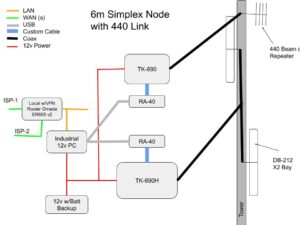
Image Description: A tower on the right with antennas for 6m and 440. 12V Power from solar inverter and battery (red lines). Network: Router connected to internet (green) WAN cables, to a small PC (orange) LAN cables. PC USB links to radios via interfaces (Grey). Custom cables DB9 to DB25 (Blue). Coax cables (Black).
ISP means Internet Service Provider, like your home Wi-Fi company. To find your internet address (IPv4), go to WhatIsMyIPAddress.com or WhatIsMyIP.com. You’ll need to log into your home router to set things up, like opening a “door” (port forwarding) for AllStar. For easy steps, check this PCMag guide or HP’s tips. For AllStar specifics (like forwarding UDP port 4569), see the HamVOIP Setup Guide (PDF) or AllStarLink forum.
This setup doesn’t need a “duplexer” (a filter for full repeaters)—it’s “simplex” (one frequency at a time, like walkie-talkies). Perfect for home or a small spot. No tower needed to start—use a pole in your yard. It fits TTN’s big idea: A strong, volunteer network by hams for hams. Why Build This? (Simple Version)
TTN wants cheap, tough radio links like pros use (e.g., Tennessee’s TACN system). Start with internet linking via AllStarLink, add RF backup for no-internet times. Use 6m band (around 50-54 MHz) because it travels far over hills—great for chats or emergencies. No complicated permits needed for this basic setup. Connect to TTN’s hub or others for statewide talk. Later phases add full RF mesh (like a web of radio links) without internet on a microwave links (old AT&T network) aka LAN network that ARDEN or HAMWan makes and uses 44net address sometimes.
From the proposal: TTN is a “teachers lounge” for hams—no dues, open to all licensed operators. It’s for daily chats, emergency backup, mentoring newbies, and tech fun. Led by W4BWW (Bobby Whitaker, with 17+ years experience), we’re building resilient nodes in places like Piedmont, Middleton, Cookeville, and Holcomb, MS.
Basic Terms for Newbies
- Node: Your radio-computer setup that links to others.
- AllStarLink: Free app to connect radios over internet/RF.
- Simplex: Talk on one frequency (e.g., 52.525 MHz).
- RF: Radio waves, no wires.
- UHF/VHF: Bands like TV channels for ham radio.
Key Parts Explained (With Why and Easy Tips)
We’ll break it down like a shopping list. Costs are rough (2025 eBay/Amazon). All open-source—share and reuse!
1. Radios (The “Mics” That Send/Receive)
- TK-690H (for 6m): Tough old Kenwood radio for 6m band. Set at 45W power, good for far signals and contuous duty being a 110w radio. Why? Cheap used, built like a tank. Cost: $50-350. Hook it to the interface for control.
- TK-890 (for 440 MHz UHF): Backup radio for when internet fails—point it at another ham’s setup. Set for 15W but a 45W let contuios duty cycle. Cost: $30-450.
- Tip for new guys: Other radios like TK-790 work for 2m (144 MHz), but check SERA.org to avoid interfering with your locals. Use filters/isolators (like from LowBandSystems) if antennas are close—stops buzz or feedback. Space antennas vertically! For advanced users: Linking small nodes like this is low-risk, but always check with hub owners first to avoid overloading big systems.
2. Interfaces (Connect Radio to Computer)
- RA-40 (need 2 or more, lol): Cheap USB adapters (like a sound card) to link software to radios. Handles talk/listen signals. Why two? One per radio. Plug-and-play. Cost: $35-95 each.
- W4BWW uses masters commucniations owned by Kevin Custer, However their are many that make various USB sound cards URI, repeater-builder.com (Scott)
3. Computer (The “Brain”)
-
Industrial 12V PC: Small, tough box (e.g., used Advantech on eBay) runs AllStar software. No fans, works in heat/cold. Cost: $50-200.
Raspberry Pi vs. This? Pi is cheap ($50-80) and can be toughened up (add case, battery backup). Good for home tests. But for remote spots, industrial PCs win—they’re ready-made tough, cheaper overall ($150+ total for Pi + extras vs. $50-200 for surplus PC). See table:
What? Pi (Toughened) Industrial PC Cost $50-80 + $50-100 extras . $50-200 ready Toughness OK, but cards fail easy Built for 24/7, wide power . Power 5V picky 12V easy with solar Extras Limited ports More for multi-radios Why Pick? . Start cheap Less downtime in field TTN uses industrial fan-less PC these for sites like Piedmont (W4BWW’s hub).
4. Networking (Internet Link)
- Router with VPN is helpful as well (e.g., Omada ER605 v2): Handles two internet lines, secure connections. Why? Cheap remote control. Cost: $60. Any router works if you set static IP. For advanced like AREDN/HamWAN (microwave nets), use proxies. Learn at AREDN.org or HamWAN.org.
5. Power (Keep It On)
- Hybrid Solar Inverter (120V AC): Turns sun/battery into power. Sungold type. Cost: $300-500. Not needed everywhere—test for radio noise first from the inverter!
- 12V Battery (e.g., Redodo LiFePO4): Backup for blackouts, safe built-in protection. Cost: $150-300. Great for storms, like TTN’s 12v only solar sites.
6. Antennas & Tower (Send Signals)
- DB-212 Bay (6m): Omni antenna for all-around coverage. Key here is DC GROUNDED.
- 440 Antenna (Vertical or Beam): Point at key repeaters for backups. Use yagi for distance.
- Tower/Pole: Start with a simple mast. Black lines = coax cables.
Total cost: $500-800 (skip solar/tower for cheaper start).
Easy Build Steps
- Get Stuff: eBay for used radios/interfaces, Amazon for rest.
- Software: Download Debain and install ASL (free). Sign up at allstarlink.org for a node number. As well as the install guide on their Github. They have support staff now!
- Wire Up: Use Powerpole plugs for power, standard cables for rest. (power poles work but ideally but use ring or better terminals for better current handling for longevity.)
- Test: Talk on 6m locally, or then UHF or VHF.
- Connect: Use AllStar app to link. or DVSwitch App allows use and DTMF also of the Allstarlink VOIP system on your phone.
- Watch: VPN for remote checks.
Connect to Real Nodes (Examples)
Try these to hear how it works—no commitment!
- Bobby’s Node: TN.W4BWW.NET – W4BWW’s test hub in Tennessee.
- TTN Hub: HUB.TTN.RADIO – Main TTN connect point (coming soon).
- East Coast Reflector (ECR): A big ham group for worldwide chats and nets. Connect via their site: eastcoastreflector.com. Great for beginners—friendly, no bad language, daily “Morning Brew” net.
- Ham Radio Crusader (Freddie Mac): Awesome YouTube for AllStarLink “HOW To” tips, portable nodes, and fun ham stuff. Channel: youtube.com/@HamRadioCrusader. Check videos like “Getting Started in ALLSTAR”. Also, his site hamradiolife.org has Discord and nets.
Next Steps & Help
- Join TTN nets (open to all)—no pressure.
- Docs coming to ttn.radio HERE soon!
- Questions? Email W4BWW at bobwwj555@gmail.com. Check full proposal—fingers crossed for ARDC approval!
Build, chat, learn—your way! 73 (ham for “best regards”) from TTN.